
If you run a hospital or health system, you need both vendor access control and PAM. One controls how outside vendors get in. The other controls what high-level accounts can do after access is granted.
Here’s the short version:
- Vendor access control covers third-party entry
- PAM covers privileged actions and credentials
- Using only one leaves a gap
- In healthcare, that gap can affect patient care, ePHI, and HIPAA audit work
The risk is not small:
- 67% of healthcare organizations were hit by ransomware in 2024
- 35% of reported healthcare data breaches happened at third-party vendors
- Healthcare breaches cost an average of $10.93 million per incident
- Compromised credentials play a role in 68% to 89% of healthcare breaches, depending on the report cited
What I’d keep in mind is simple:
- Use vendor access control for vendor logins, MFA, time limits, named accounts, and session rules
- Use PAM for vaulting, password rotation, just-in-time admin rights, and session recording
- Put them together so vendors get narrow entry and only limited elevated access when needed
- Add governance on top so access matches vendor risk
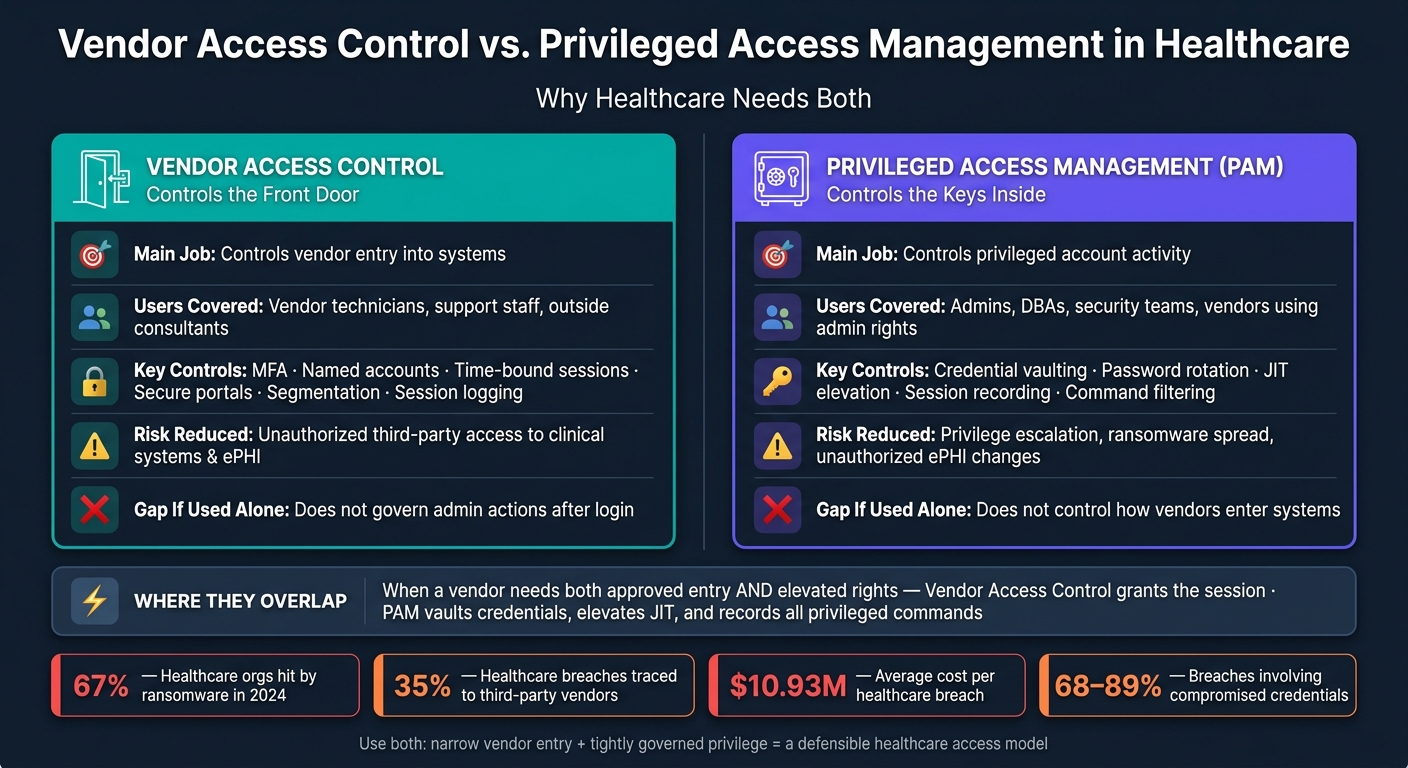
Vendor Access Control vs. PAM in Healthcare: Side-by-Side Breakdown
Vendor Privileged Access Management overview
sbb-itb-535baee
Quick Comparison
| Area | Vendor Access Control | PAM |
|---|---|---|
| Main job | Controls vendor entry | Controls privileged activity |
| Main users | Vendor technicians, support staff, outside consultants | Admins, DBAs, security staff, and vendors using admin rights |
| Focus | Who can connect, when, and to what | What elevated accounts can do |
| Common controls | MFA, secure portals, named accounts, time-bound sessions, segmentation | Vaulting, password rotation, JIT elevation, session recording, command limits |
| Main risk it reduces | Third-party vendor risk into clinical systems | Overpowered accounts, lateral movement, data changes, ransomware spread |
| Main gap if used alone | Does not control admin actions after login | Does not control how vendors enter |
So if I had to put it in one line: vendor access control handles the front door, and PAM handles the keys inside.
What Vendor Access Control Covers in Healthcare
Vendor access control sets the rules for which outside users can get into which systems, from where, and for how long.
The key difference is simple: vendor users are not treated like internal staff. They have separate identities, different approval steps, tighter permissions, and stricter session limits. In healthcare, that usually comes up during remote support, device maintenance, and application troubleshooting.
Common Healthcare Use Cases
Here are the most common situations where vendor access control comes into play:
- Medical device maintenance: A vendor signs in with MFA and reaches only the specific device approved for that session.
- EHR support: A vendor uses named credentials and logs in through a secure gateway to the approved admin interface.
- Revenue cycle support: A vendor gets time-bound access to the relevant application during a defined work window.
Key Controls for Third-Party Access
The controls that make vendor access audit-ready in healthcare work in layers. That means using MFA, named accounts, session-based access, time-bound approvals, segmentation, and session logging together.
Miss even one of those pieces, and the whole setup gets weaker. A vendor session can become a direct path into clinical systems. That’s the part many teams learn the hard way.
The Main Risk Vendor Access Control Addresses
Without these controls, vendors can end up with broad, long-lived access to systems that hold PHI. And that creates a serious problem: one compromised account can turn into a path straight into clinical systems, contributing to the economic impact of third-party risk.
Vendor access control cuts down that exposure by replacing standing connectivity with narrow, temporary, and monitored sessions. This is a critical component for how healthcare organizations manage third-party risk effectively.
That handles external entry. PAM governs what powerful accounts can do once they are inside.
What Privileged Access Management Covers in Healthcare
If vendor access control decides who gets in, PAM decides what they can do once they’re in.
PAM controls, watches, and audits elevated permissions across on-premises, cloud, and clinical systems. And it applies whether the user is internal or external. What matters here isn’t employment status. It’s the level of privilege tied to the account.
Accounts and Systems PAM Is Designed to Protect
PAM is built to protect accounts with broad power, including domain admin, DBA, service, cloud admin, EHR back-end, and medical device management accounts. These accounts matter because they can get around normal safeguards and reach large volumes of ePHI.
Core PAM Controls
PAM works through a layered set of controls so high-risk admin actions are planned, approved, and visible.
- Credential vaulting stores privileged passwords in a secure vault, so users don’t handle the credentials directly.
- Automated password rotation changes those credentials so they don’t stay the same for long.
- Just-in-time (JIT) elevation grants admin rights for a set window - say, 30 minutes - and then removes them automatically.
- Controlled session brokering and session recording log commands and actions during high-risk sessions, which creates a defensible audit trail.
- Command controls stop specific dangerous actions, like bulk deletion or disabling audit logs, before they run.
That matters in healthcare. These controls help limit unauthorized changes to patient data, clinical workflows, and audit logs.
The Main Risk PAM Addresses
PAM cuts down on standing privilege - admin accounts that stay active all the time and stay high-risk all the time. Instead, it turns those into non-privileged accounts that receive elevation only when a specific task calls for it.
IBM's 2024 Cost of a Data Breach Report found that healthcare breaches average $10.93 million per incident and that 89% involve compromised credentials, while Verizon's 2024 Data Breach Investigations Report found that 68% of healthcare breaches involve compromised credentials, compared with 49% across industries.[3]
Controlled sessions also limit the routes privileged users, including vendors, can use to reach critical systems. And session recordings give security teams a clear record of what happened and when. That difference comes into focus in the side-by-side comparison that follows.
Vendor Access Control vs. PAM: Differences, Overlap, and When to Use Each
These two areas handle different jobs. Vendor access control manages entry. PAM manages privileged actions. That distinction matters a lot in healthcare, where third-party access and admin-level rights often meet.
Side-by-Side Comparison: Scope, Controls, and Outcomes
The table below shows where each one fits.
| Dimension | Vendor Access Control | Privileged Access Management (PAM) |
|---|---|---|
| Primary focus | Third-party access control | Privileged account control |
| Users covered | Vendor technicians, support engineers, implementation consultants | System admins, DBAs, security teams, and vendors using privileged accounts |
| Common healthcare use cases | Remote EHR support, medical device maintenance, cloud application troubleshooting | EHR database administration, Active Directory configuration, management of virtualized infrastructure |
| Key controls | Onboarding workflows, contract-based approvals, secure access portals, MFA, time-bound sessions | Credential vaulting, just-in-time elevation, session recording, command filtering |
| Monitoring focus | Which vendors are connected, to what systems, and during what windows | Privileged commands, configuration changes, database queries touching PHI |
| Main risk reduced | Unauthorized vendor access to clinical systems and ePHI | Privilege escalation, ransomware spread, and unauthorized ePHI changes |
Where the Two Disciplines Overlap
The overlap shows up when a vendor needs both approved entry and elevated rights. Picture an EHR vendor support engineer working a production database issue. Vendor access control decides whether that person can connect in the first place - through an approved secure portal and only during an allowed window.
After that, PAM steps in. Credentials are pulled from a vault, elevated rights are granted just in time, and the session is recorded while privileged commands are logged.
Gaps That Appear When Only One Approach Is Used
Vendor access control alone handles the front door, but not what happens after someone gets in. Once a vendor session starts, a technician may end up with local or domain admin rights, and those privileged actions may not be governed. Without PAM, there’s no detailed audit trail for privileged activity. That makes post-incident forensic review harder and weakens HIPAA audit controls. Organizations can address these gaps by implementing automated vendor solutions that streamline the assessment process.
PAM alone locks down privileged accounts, but it doesn’t deal with the third-party side very well. PAM does not control vendor entry. If vendors connect through ad hoc VPNs or shared remote desktop tools outside the PAM environment, those access paths remain unmonitored. In U.S. healthcare, where third-party risk management is still a major issue, that’s a serious gap.
The next section shows how to combine both into one healthcare access model.
How to Build a Combined Access Strategy in Healthcare
Once you’ve nailed down the difference, the next move is to build one access model that covers both vendor entry and privileged action.
Steps for Combining Vendor Access Control and PAM
Start with a full inventory. List every privileged account - internal admins, service accounts, and vendor logins - next to every vendor connection path, including VPNs, remote support tools, cloud portals, and device tunnels. Then map each one to the systems it can reach, whether that’s an EHR, PACS, lab system, or a networked medical device.[1][2]
Shared vendor accounts are a bad bet. Each vendor technician should have a named, individual login tied to a specific contract and business purpose.[4] If something goes wrong, you need a straight line from the activity to the person who did it.
Next, sort systems by sensitivity. Tier 1 systems - EHRs, patient monitoring, medication systems, and networked medical devices - should require MFA, controlled gateways, and full session recording for privileged activity.[5][6] Lower-tier systems can work with fewer controls, but the rules should be clear and written down.
After that, apply least privilege and MFA across the board. Vendors should get access only to the systems their contract allows, only during approved time windows, and only through controlled entry points. Route privileged tasks through PAM whenever you can. Approval, monitoring, and offboarding should be split across IT, security, clinical engineering, and compliance so no one team carries the whole load.
Where Healthcare Risk Management Platforms Fit
Those controls handle access. Governance decides whether that access should happen in the first place.
Censinet RiskOps™ sits above PAM and vendor access tools at the governance layer. It helps teams run vendor risk assessments, compare cybersecurity posture, and guide access decisions. A vendor with a stronger assessment result and lower residual risk may get more flexible remote access. A vendor with open findings may be limited to narrower sessions with closer monitoring.[5]
It answers the question PAM by itself can’t: should this vendor have this level of access at all, given their current security posture?
Conclusion: The Key Decision for Healthcare Leaders
When enforcement and governance work together, the access model gets easier to manage and audit.
Healthcare leaders should treat vendor access control and PAM as one program: narrow entry, then tightly govern privilege.
FAQs
Do hospitals need both vendor access control and PAM?
Not as separate or conflicting requirements. PAM is the recommended technical framework for securing vendor access.
When hospitals apply PAM to third-party vendors, they can use the same centralized controls they already rely on for internal administrative accounts. That includes multi-factor authentication, just-in-time access, and session recording to support HIPAA access and audit standards.
When should a vendor session trigger PAM controls?
Vendor sessions should trigger PAM controls any time a third party needs elevated access to critical systems, like EHRs, databases, clinical apps, or any environment that stores ePHI.
They should also apply to high-risk vendor accounts and unusual activity, such as off-hours access, logins from unexpected locations, or attempts to change security settings without approval.
How do we prioritize systems for stricter access controls?
Start with a full inventory of every entity that can access your networks, applications, or PHI. That means everyone and everything - employees, contractors, vendors, service accounts, and bots.
Next, rank vendors and systems based on three things:
- access sensitivity
- privilege level
- potential patient impact
Focus first on high-risk systems like EHRs, clinical devices, and PHI databases. These systems should get multi-factor authentication, just-in-time access, and continuous session monitoring before lower-risk assets do.
Regular reviews matter here. So do automated audits. Together, they help keep your priority list up to date as access changes, new vendors come in, and systems shift over time.
