
A hospital incident report has to do three jobs at once: support the technical review, support HIPAA breach review, and show whether patient care was affected.
If I had to sum up the full process in a few lines, it would be this:
- I define the case scope, the readers, and the report format first.
- I record and preserve evidence before logs change or systems restart.
- I build findings from facts, with each claim tied to a source.
- I document PHI exposure, downtime, and patient care impact in plain terms.
- I turn each finding into a tracked follow-up item with an owner and due date.
Timing matters. HIPAA breach review and notices are often tied to a 60-day window from discovery, and investigation records should be kept for at least 6 years. That means the report cannot be vague, late, or missing proof.
Here’s the short version of what the article covers:
- Scope: which systems, users, data, and clinical workflows were affected
- Structure: a fixed layout from executive summary to appendices
- Evidence: RAM, disk images, EHR audit logs, device logs, cloud logs, and custody records
- Findings: timeline, root cause, PHI review, downtime, and patient safety effects
- Follow-up: lessons learned, risk register updates, third-party vendor risk review, and tracked action items
A strong report keeps facts separate from analysis. It also states both what I found and what I did not find, such as no PHI exfiltration or no sign of record tampering.
If you want a simple rule, use this one: write the report so legal, privacy, clinical, and security teams can all use the same document without guessing what happened.
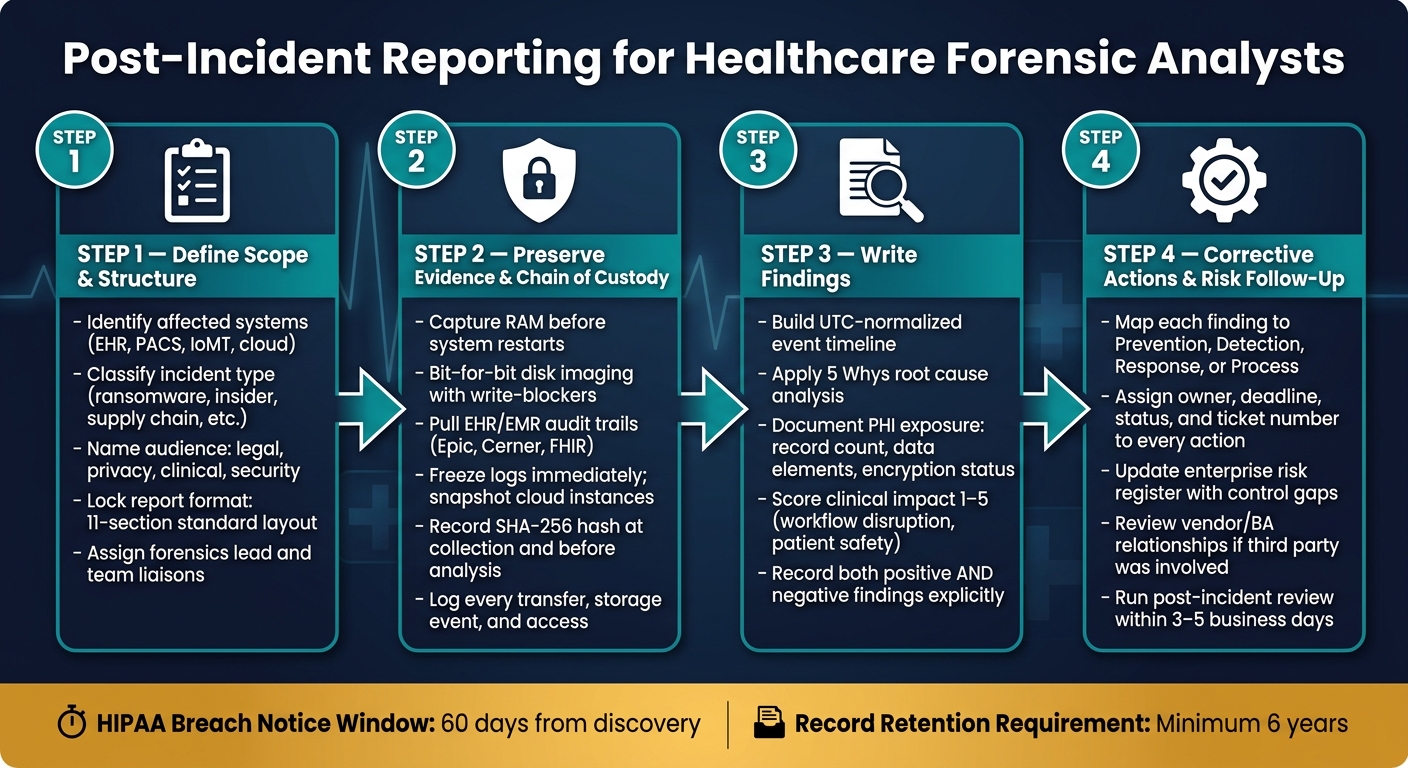
Healthcare DFIR Report: 4-Step Post-Incident Reporting Process
Step 1: Define the report scope, audience, and required structure
Before you write a single finding, lock down the scope, audience, and report structure. If you skip this step, the rest of the report gets messy fast.
Set the case scope and incident classification
Scope tells the reader what was affected: systems, people, and data. At a minimum, name the systems involved, such as EHR platforms, PACS imaging servers, email infrastructure, SSO/MFA identity providers, medical and IoT devices, and any cloud services (SaaS/PaaS) tied to the incident [3][1]. You should also spell out the data at risk, including PHI, PII, financial data, and clinical metadata such as HL7/FHIR logs [2][3].
Next, define the incident lifecycle from initial access through full recovery. Be specific about any clinical workflows that were disrupted, like medication reconciliation or emergency department charting [2]. In healthcare, scope isn't just about system compromise. It also has to show the clinical effect.
Classify the incident early using a standard category, such as:
- ransomware
- credential compromise
- insider misuse
- third-party and supply chain security risks
- medical device compromise [1]
That early label helps the team pick the right playbooks and decide which extra report sections may be needed.
This scope becomes the frame for every finding that follows, especially around patient safety and PHI exposure.
Use a standard report format from executive summary to appendices
A healthcare DFIR report should use the same section order every time. That makes the report easier to review across privacy, legal, clinical, and technical teams. It also helps keep executive content separate from deep technical detail.
Time handling matters here. Every timestamp in the report should use one consistent format. For U.S. reporting, use a format like MM/DD/YYYY, h:mm a.m./p.m. EDT. If the case involves cloud or distributed systems, normalize distributed logs to UTC and record each conversion. Also confirm that forensic tools are time-synced during triage [1][3].
| Order | Section | Key Content |
|---|---|---|
| 1 | Title & Case Identifiers | Case ID, date, severity, Incident Commander |
| 2 | Executive Summary | Verdict, clinical/business impact, current status |
| 3 | Objectives & Scope | Systems, facilities, users, PHI data types in scope |
| 4 | Evidence Inventory | Item IDs, SHA-256 hashes, chain-of-custody records |
| 5 | Methodology | Tools used (EDR, SIEM, forensic suites) and analysis steps |
| 6 | Forensic Narrative | Detailed timeline and technical analysis of attacker movement |
| 7 | Clinical Impact Assessment | Workflow disruption and patient safety evaluation |
| 8 | HIPAA Breach Assessment | PHI access, disclosure, and availability findings |
| 9 | Conclusions and confidence level | Final findings tied to specific confidence levels |
| 10 | Recommendations | Specific, measurable hardening actions |
| 11 | Appendices | Raw logs, IOCs, blast radius diagrams |
One practical tip: write the Executive Summary last, once the findings are locked. Keep it to one page or less [3].
Mandatory vs. optional report sections: a comparison table
Not every incident needs every add-on section. The base structure stays the same, but some cases call for extra material. Use the table below to decide what should be appended after the core report is done.
In healthcare, one rule is simple: every high-severity incident must include a HIPAA breach assessment. Even when the answer is "no breach," the written assessment shows due diligence [2].
| Section | Status | When to Include |
|---|---|---|
| Executive Summary | Mandatory | All incidents |
| Incident Timeline | Mandatory | All incidents |
| Clinical Impact Assessment | Mandatory | All healthcare incidents |
| HIPAA Breach Assessment | Mandatory | Any incident with potential PHI exposure or availability loss |
| Technical Analysis | Mandatory | All incidents |
| Root Cause Analysis | Mandatory | All incidents |
| Action Items | Mandatory | All incidents |
| Third-Party/Vendor Review | Optional | When breach originates from a Business Associate or vendor |
| Law Enforcement Coordination | Optional | When criminal activity is involved or federal reporting is required |
| Multi-State Notification Review | Optional | When affected patients span multiple jurisdictions |
During scoping, assign the forensics lead and name liaisons for legal, privacy, and clinical operations [1]. That way, when the facts start coming in, the right people are already in the loop, and you can decide what to append after the base report is complete.
sbb-itb-535baee
Step 2: Document evidence, preservation steps, and chain of custody
After scoping, move fast to collect and preserve evidence before it changes.
Record healthcare-relevant evidence sources and collection details
Start with RAM on live EHR servers, nursing stations, and pharmacy systems. If a system reboots, volatile data is gone. That means in-memory artifacts like active credentials, injected malware, and live network connections can vanish in seconds [1][4].
For disk collection, use bit-for-bit imaging with hardware or software write-blockers on clinical workstations and local servers. Don’t inspect the original drive directly. Work from a verified copy every time [1].
Pull EHR/EMR audit trails from platforms like Epic or Cerner. Pay close attention to access patterns and "break-glass" events, where clinicians bypass normal access controls. You’ll also want HL7/FHIR logs, DICOM/PACS access records, VPN and firewall logs, SIEM and EDR telemetry, and cloud audit trails from services like AWS CloudTrail or Azure Activity Logs [1][4].
Freeze high-value logs as soon as the incident is declared. In busy healthcare settings, logs can rotate out fast and disappear before anyone notices. For cloud-hosted apps, snapshot instances and secure audit trails before the retention window expires [4][5]. Under HIPAA, investigation records must be kept for at least 6 years [2].
For IoMT and medical devices, work with clinical engineering before you touch anything. Shutting down a device may affect patient care or destroy evidence. When containment is needed, use logical isolation instead of a shutdown, and collect data with vendor-approved or specialized methods [1][5].
Maintain a complete chain of custody record
Every evidence item needs a chain of custody record from the moment of collection through each transfer, storage event, and access. If there’s a gap, the record becomes harder to defend and easier to challenge.
At a minimum, include these fields for every item:
- Evidence ID
- Item description
- Source system
- Collection location
- Collection date and time in MM/DD/YYYY, h:mm a.m./p.m.
- Collector name
- Each transfer event, including who handed it to whom
- Storage location
- Access restrictions
- SHA-256 hash values
- Whether a write-blocker was used during acquisition
Create the SHA-256 hash when you collect the item, then verify it again before analysis. If the hash doesn’t match, the copy changed somehow - on purpose or by accident. Once that happens, the integrity of the evidence is in doubt. For HIPAA defensibility, this check matters [1][4].
Evidence types and documentation fields: a reference table
Log each evidence item the same way every time. That consistency makes later review much easier. This unified approach helps teams respond faster to risks affecting care delivery and patient safety.
| Evidence Type | Healthcare-Specific Source | Key Documentation Fields |
|---|---|---|
| Disk Images | Clinical workstations, local servers | Evidence ID, Hash (SHA-256), Write-blocker used (Y/N), Collector name, Timestamp, Tool version |
| Memory (RAM) Captures | Live EHR application servers, nursing stations, pharmacy systems | Timestamp, Tool used, System uptime, Hash (SHA-256) |
| EHR/EMR Audit Trails | Epic, Cerner, FHIR servers | User ID, Patient record ID, Access type (View/Edit/Delete), Break-glass status |
| Medical Device Logs | Infusion pumps, bedside monitors, DICOM/PACS, IoMT | Device serial number, Firmware version, Event code, Physical location, Network segment, Vendor contact |
| Network Telemetry | VPN, firewall, SIEM/EDR, HL7 gateways | Source/destination IPs, Protocol, Bytes transferred, Timestamp (UTC) |
| Cloud & Identity Logs | AWS CloudTrail, Azure Activity Logs, Okta, AWS IAM | Account ID, API call, Resource accessed, MFA status, Login geolocation, Token expiry |
These records form the factual base for the timeline and root-cause analysis that come next.
Step 3: Write findings on timeline, root cause, impact, and regulatory obligations
Once you've gathered the evidence and logged custody, the job shifts from collection to explanation. Now you need to turn raw logs, alerts, and artifacts into findings that can stand up to review from your security team, legal counsel, and, if needed, HHS/OCR.
Build a timeline and explain root cause with evidence references
Tie every finding back to the evidence IDs from Step 2. Each timeline entry should include:
- A UTC timestamp
- An event class
- An evidence ID or hash
That structure matters. If someone reviews your report later, they should be able to trace each statement back to the source without guesswork.
Before you line up events, check NTP sync across your EHR, VPN, EDR, and cloud logs. One bad system clock can throw off the whole sequence. After timestamps are normalized, correlate activity across IAM/SSO logs, EDR telemetry, SIEM alerts, and network flows. That's how you spot dwell time and see where controls failed.
For root cause, use the "5 Whys" method to get past the first obvious symptom. The root cause should be stated as a specific failure you can control and prove with evidence. Keep that separate from contributing factors, such as alert fatigue or staffing gaps. Those may explain why the damage spread, but they are not the main trigger. Also note any open gaps in the record and call out what still needs validation.
Assess PHI exposure, operational disruption, and patient safety impact
After the timeline is in place, use it to measure PHI exposure and operational impact. State plainly whether PHI was viewed, altered, exfiltrated, or unavailable to authorized users. Include the record count, the data elements involved, and encryption status to support breach analysis [2].
In healthcare, the report also needs to answer clinical questions. Were care decisions made with incomplete data? Were medication administrations delayed? Were time-sensitive alerts, such as sepsis notifications, missed or delayed?
A simple 1–5 clinical impact score can help frame that for leaders. Use it to rate workflow disruption, patient volume, and how well workarounds held up. It gives executives a quick read on patient safety risk without burying them in log detail.
Finding types and required documentation: a reference table
Use the table below to connect each finding to the records it needs to support.
| Finding Type | Required Documentation Fields | Evidence References | Regulatory Significance |
|---|---|---|---|
| Technical Finding | Timestamp (UTC), actor, action, MITRE TTP mapping, confidence level | EDR events, SIEM alerts, firewall logs, malware hashes | Low - internal hardening |
| PHI Exposure | Data elements (name, DOB, SSN), access type (viewed/exfiltrated), record count, encryption status | EHR audit trails, DLP triggers, database query logs | High - HIPAA/Regulatory |
| Operational Impact | Affected clinical workflows, downtime duration, clinical impact score (1–5), workaround effectiveness | Clinical IT reports, system availability logs, help desk tickets | Medium - patient safety, Joint Commission |
| Regulatory Trigger | Jurisdiction, statutory deadline, breach determination rationale, materiality assessment | Legal counsel review, privacy officer assessment, BAA obligations | High - HHS/OCR; legal review |
Record negative findings too. This is one of those small habits that can save a lot of pain later.
If your review shows no unauthorized access, say so directly. For example:
"No PHI exfiltration detected based on DLP logs and EHR audit trails"
That is much easier to defend than leaving the issue unstated. Positive findings, negative findings, and open questions all belong in the record.
Step 4: Capture lessons learned, corrective actions, and risk management follow-up
Document lessons learned and assign corrective actions
Once the findings are documented, turn them into tracked remediation work and risk updates. Each finding should become a corrective action with a clear path to closure. In healthcare, that means fixing both the technical issue and the clinical workflow gap that came with it.
Start with the root cause, then turn it into actions across four buckets: Prevention, Detection, Response, and Process. That makes it easy to see what each fix is supposed to do. Tie every action back to the finding ID and the evidence set behind it. Each one also needs four basic fields:
- a named owner
- a firm deadline
- a status: Open or Closed
- a ticket number for tracking
Each action should map to a finding ID, owner, deadline, and risk domain. Track every item through closure, and escalate anything overdue. And when you write lessons learned, frame them as system gaps, not personal mistakes.
Connect incident findings to enterprise and third-party risk workflows
A forensic report sitting in a folder doesn't lower risk. It has to feed the risk program.
Record root causes and control gaps in the risk register, then link them to the right risk domains: PHI handling, clinical applications, medical devices, and third-party vendors. If a business associate or outside vendor was involved, the report should trigger a review of that relationship. That review should cover contract and SLA performance, shared responsibility gaps, and whether the relationship should be reassessed [6].
Use Censinet RiskOps™ to connect incident findings to enterprise and third-party risk workflows.
Conclusion: What a defensible healthcare forensic report must include
A good report makes the next review faster, clearer, and easier to check. It should include defined scope, preserved evidence, evidence-based findings, PHI exposure analysis, clinical impact, breach assessment, and accountable remediation [2].
| Action Category | Example Corrective Action | Owner | Tracking |
|---|---|---|---|
| Prevention | Add guardrails to limit bulk exports | Engineer B | PLAT-1234 |
| Detection | Add JVM heap alerts | Engineer A | PLAT-1237 |
| Response | Update the runbook for OOM events | Engineer A | PLAT-1239 |
| Process | Add production-scale data to staging | DevOps | PLAT-1242 |
Run the post-incident review within 3 to 5 business days while details are still fresh [2]. Keep breach assessment records, including "no breach" determinations, for at least 6 years [2]. The final report should give legal, privacy, clinical, and security teams clear facts and assigned next steps.
FAQs
How detailed should a post-incident report be?
A post-incident report needs enough detail to act as the single source of truth for technical teams, executives, legal counsel, and auditors. It should spell out the who, what, when, where, why, and how in plain terms, without gaps or guesswork.
The technical analysis also needs to go deep enough that another analyst could reproduce the investigation months later. That means the report should show what was reviewed, what was found, and how each finding was tied back to the incident.
For healthcare organizations, there’s another layer. The report should cover clinical impact, possible PHI exposure, and any regulatory reporting needs.
Who should review the final forensic report?
The final forensic report should be reviewed by key stakeholders to check accuracy, back the legal strategy, and stay in line with compliance needs.
Typical reviewers include legal counsel, key executives, privacy or security officers, incident commanders, IT operations, application owners, and affected business leads.
What makes a healthcare incident report legally defensible?
A healthcare incident report is legally defensible when it shows care, openness, and compliance with regulatory requirements. It should clearly document the discovery time, the event itself, the scope of PHI involved, and the steps taken to contain and mitigate the issue.
It also needs a verified chain of custody for digital evidence, validated logs, and clear, time-stamped records. For major incidents, include post-incident risk assessments and tracked corrective actions.
